
Executive summary:
The fundamental problem in AI engineering is how to provide developers with agents without the risk of them causing harm. Furthermore, how can one assign complex, undefined tasks—such as troubleshooting or feature development—to these agents? Additionally, how can knowledge be scaled across a team?
To answer these questions, agents need more than just a list of functions; they require a secure, persistent environment to safely explore, execute, and validate their work. In this article, we explain the architecture we designed to solve this for a data-engineering customer on Google Cloud.
The solution integrates an existing web application and agent orchestration layer, an embedded coding-agent harness, and a dedicated GKE Agent Sandbox for each workspace. This setup not only isolates execution but also uses snapshots to create resumable workspaces, ensuring an engineer's running processes are safely saved and restored after a break. We also share what this proof of concept taught us about isolation, identity, networking, persistence, latency, and operations.
The customer wanted data engineers to use AI without installing and governing agent harnesses on every engineer's workstation. The team had no direct subscription with other model provider: Google Cloud had to remain the inference and billing boundary.
The customer had built an early web-based prototype connected it to Azure DevOps, BigQuery, Dataform, Cloud Composer, Power BI, and a curated knowledge base in Agent Search. The prototype used separate specialized agents with dedicated tools and prompts for jobs such as data pipeline development, architecture validation, and user-story creation based on vague feature ideas.
The prototype was useful, but it was a basic function-calling assistant without any loop, its architecture stopped at question → function call → answer. That shape has four limitations:
The missing capability was a controlled execution plane in which an agent could explore and validate its work, while continuing to use models through Google Cloud.
The limitations also pointed to a simpler agent structure, most roles did not need independent agents with duplicated function lists. They needed one capable execution loop with skills loaded for the task. A data pipeline skill can encode repository conventions and validation; a story-refinement skill can define its workflow and output; skills stored in a repository change together with its code. Separate agents remain useful for different identities or lifecycles, not merely different instructions.
A production execution environment should be designed from the threat model, not from the demo. Treating all generated commands as untrusted, enforcing short-lived scoped identity via Workload Identity Federation, and blocking internal network ingress/egress while allowing only specific public HTTPS endpoints is crucial. Our key constraints were:
The comparison reflects the options as we assessed them in October 2026.
Governed, interactive engineering execution
The provider-managed options were poor fits because the customer had no model-provider subscription and wanted inference to remain in GCP. Agent Runtime was strategically attractive, but its standard Code Execution sandbox did not provide the networked, customizable engineering workspace needed to clone Azure Repos and run project toolchains. Custom containers can narrow that gap, and Agent Runtime remains an option as the managed control plane matures. A VM per engineer also gives long-lived workspaces, but it keeps paying for idle machines and leaves isolation, images, and lifecycle to us. Pod snapshots let us keep sandbox isolation while a suspended workspace costs only its snapshot storage.
For the proof of concept we chose GKE Agent Sandbox. It combines Kubernetes scheduling and policy with a gVisor-isolated runtime designed for agent-generated code, while allowing our own harness image and Gemini Agent Platform inference. It is not a complete security system by itself: IAM, network policy, secret delivery, image security, quotas, and audit logging still matter.
We defined a hard boundary: the control plane authenticates and applies policy, while the execution plane (the sandbox and harness) does the actual work with bounded CPU, memory, time, and network access. The key design decision is to keep orchestration outside the sandbox and the agent's work inside it.
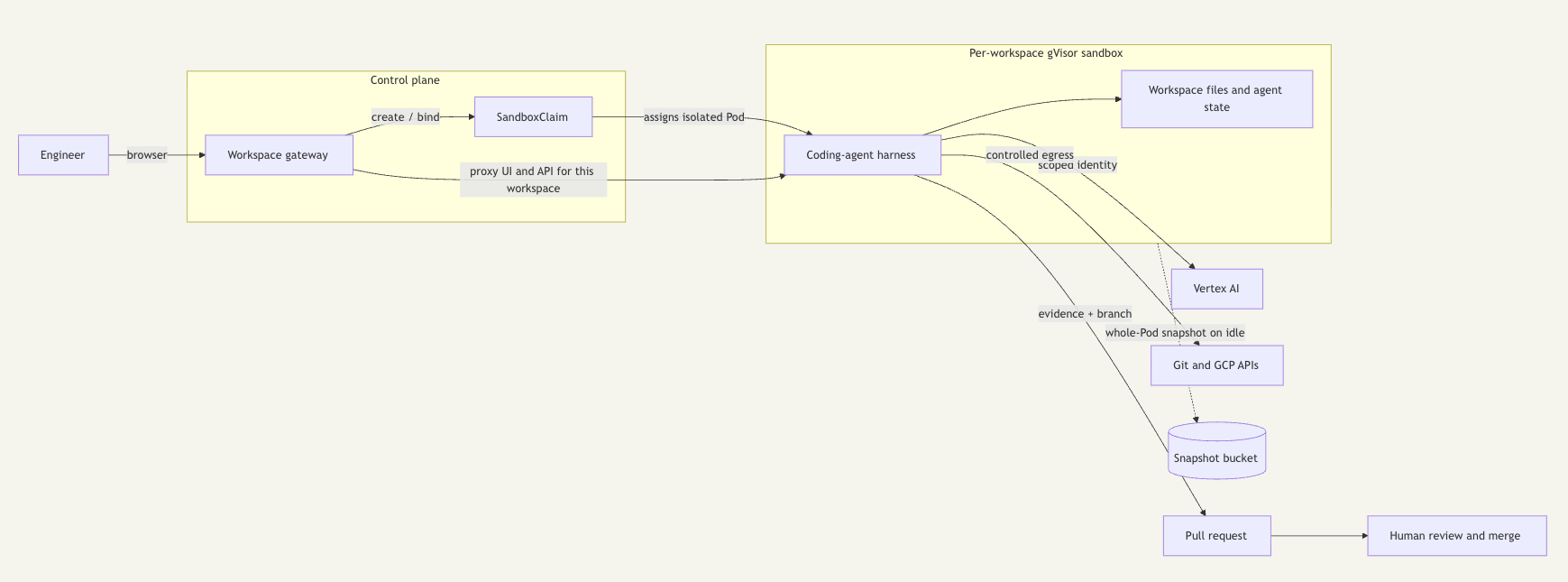
The control plane authenticates the user, applies policy, creates and resumes workspaces, and records lifecycle events. It should not run model-generated commands. The sandbox image and the harness configuration define which models, tools, and permissions are available; the harness loads skills itself. A SandboxClaim is the GKE Agent Sandbox resource that requests a sandbox; when a pre-started sandbox is free in the warm pool, the claim binds to it at once. In the prototype, the gateway serves opencode's own web UI from the sandbox. Providing a nice UI for not just chatting with the agents but actually observing what they change and edit files directly.
The execution plane contains the coding-agent harness and workspace. It can use file, shell, and repository tools, but only inside a sandbox with bounded identity, network access, CPU, memory, time, and storage.
The execution environment and the harness are separate choices. We selected opencode because the complete harness was open source, built to embed as a server, and had a directly validated Gemini-on-Vertex path without a separate provider subscription. It already provided repository exploration, file and shell tools, a multi-step work-check-correct loop, event streaming, and permissions. In the second iteration of our prototype, we replaced our own chat UI with opencode's native web interface, which already provides session, file, diff, and terminal views. A chat alone is not enough: engineers need to inspect, edit, and comment on what the agent changed before they continue the conversation. One workspace, one sandbox
A shared sandbox is acceptable for proving that a model can clone and inspect a repository. It is not a multi-user architecture. A Kubernetes Service in front of a pool is also insufficient: normal load balancing may send consecutive requests to different filesystems.
Our first iteration bound each chat thread to its own sandbox and deleted it after an idle timeout. That model was safe, but it lost context: every new conversation started from an empty disk, and engineers often wanted a second conversation about the same checkout. The second iteration therefore makes the workspace the isolation boundary:
The workspace gateway keeps one durable record per workspace (in our prototype, a Kubernetes ConfigMap). The record holds the claim, the snapshot group, the lifecycle state, and the last activity time. A gateway restart or deployment therefore does not lose or delete workspaces. Each workspace is served on its own browser origin, because opencode's web UI selects its server by origin and separate origins let two workspaces stay open side by side. The gateway resolves the workspace's current Pod address on every request instead of caching it, because a restored Pod usually gets a new IP address.
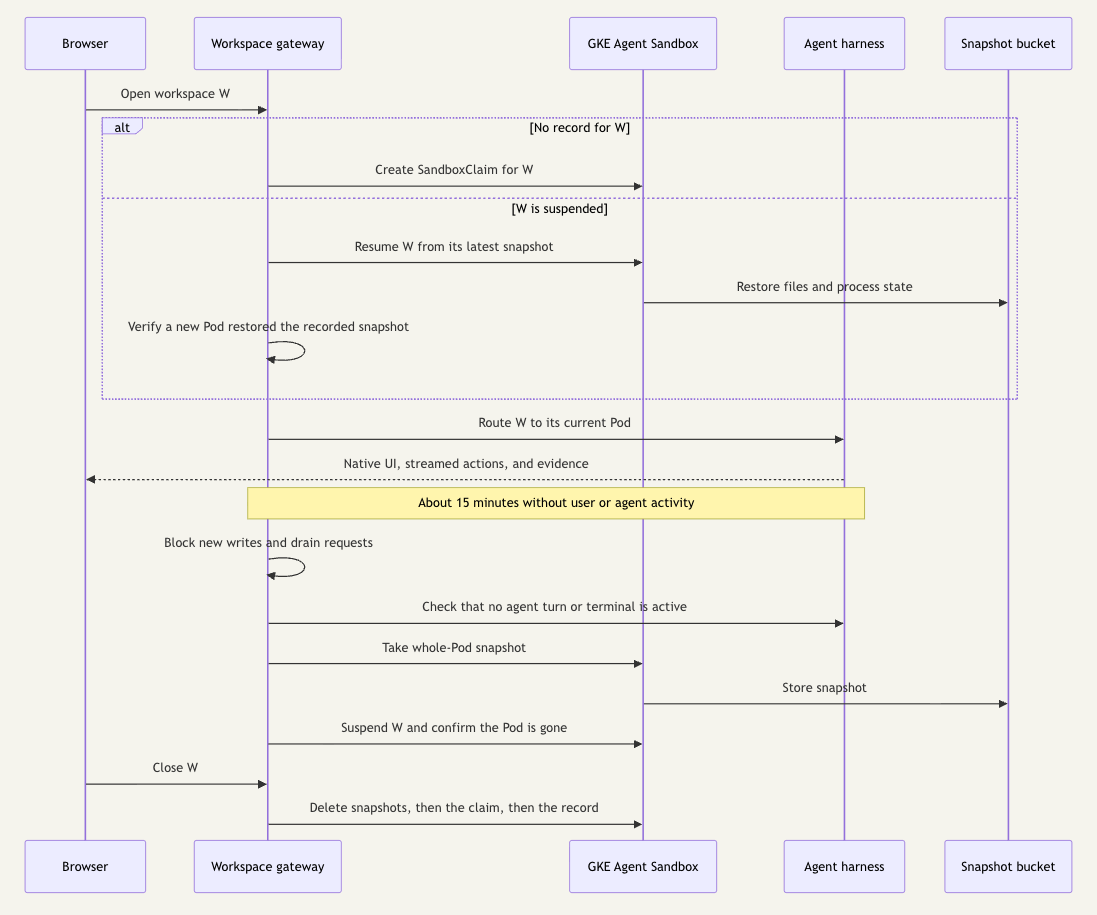
A warm pool keeps a few sandboxes started in advance, so a new workspace does not wait for a new node, which can take minutes. When a workspace is closed, its sandbox and snapshots are deleted rather than returned for reuse, and the warm pool provisions a fresh replacement. Filesystem and process state therefore do not cross workspace boundaries.
GKE Pod snapshots capture a whole Pod: its filesystem and the memory of its running processes. That is the difference from a persistent volume. A volume keeps files, but the agent harness would restart cold. A Pod snapshot brings back the running opencode server, including its sessions, so the engineer sees the same conversation, files, and diffs after a resume.
After about 15 minutes without user or agent activity, the gateway suspends the workspace. Suspension must never capture a workspace in the middle of a change, so the gateway follows a strict order:
A resume is accepted only when a different Pod reports that it restored the recorded snapshot. A Pod that starts without that confirmation is not accepted as a restore, even if Kubernetes reports it as ready.
This verification proved necessary. In our October 2026 tests, on newly provisioned Autopilot nodes, some restores started an empty Pod instead of the saved state, with the error the storage backend may not be available. The saved snapshots were intact and restored correctly once the nodes were initialized. We did not establish the root cause. The gateway now keeps the workspace blocked, removes the empty Pod without taking a snapshot of it, and retries the same snapshot once. If that also fails, the engineer sees a Retry restore action instead of a silently empty workspace.
Other practical lessons:
At the time of our tests, Google's suspend/resume tutorial used a manually installed Agent Sandbox controller. In our tests, the managed GKE add-on completed snapshot, suspend, and resume, so we kept the manual controller only as a documented fallback.
The sandbox is only one layer. The prototype implements gVisor isolation, Workload Identity Federation, a non-root runtime with resource limits, images pinned by digest, and a dedicated, access-restricted snapshot bucket. The rest of this list is our recommended production baseline; the gaps are listed further below.
For complex problems—where you aren't just addressing a single workflow—a different kind of solution is required.
Specialized agents with their own dedicated tools are becoming obsolete, probably they were not the answer in the first place; instead, you need a general-purpose harness, augmented with your domain knowledge and access to your tools.
Furthermore, you need a secure environment where this harness can operate without causing any harm.
Agent safety comes from making the environment safe when the model is wrong.
In practical terms: reuse a capable harness, run each workspace in its own sandbox, suspend it safely when idle, grant the minimum identity and network access, collect evidence, and stop at a human approval gate. This architecture lets agents inspect the current code and systems instead of depending on stale documentation, while keeping their execution bounded enough to earn trust incrementally.
Providers no longer only host models: they now offer whole agent harnesses as managed APIs. Claude Managed Agents and Google’s Managed Agents (Gemini API and Agent Platform) each run the vendor’s own agent loop in a hosted sandbox. Google’s open-source Agent Substrate gives GKE built-in, sub-second suspend and resume, which covers much of the lifecycle code we wrote by hand. In October 2026, the two managed APIs were in preview or beta, tied to the vendor’s harness and models, and had no EU inference pin. Agent Substrate was for non-production use only. We expect the build-versus-buy line for agent execution to move soon.


